Can Google Maps act as a speed camera warner?
 Alvaro Avilés
14 June 2019
5 min.
Alvaro Avilés
14 June 2019
5 min. Google Maps has been updated and has added the speed camera warning feature to its app, so we reveal all its secrets.
When we get in the car and don’t know how to reach our destination, we have several options. The first is to use the car’s built-in navigation system, if it has one, although it is usually very confusing. If you are a nostalgic type who refuses to admit you live in this century, you might take out the Michelin Guide, put the pen in your mouth and spend half an hour looking for the best route with the map spread over the bonnet.
However, the option most Spaniards use is to grab the phone and tap that green and blue circle that has so often helped us avoid ending up in Cádiz when we wanted to go to Bilbao: Google Maps. It is true that some apps such as Waze have taken some of its prominence, but after the latest update to Google’s app, which now also shows fixed and mobile speed cameras, Waze has got a lot harder to justify.
So, now that Google Maps is more complete than ever, at Tech y Motor we thought it was a good time to review this app and cover all its advantages and disadvantages.
How does Google Maps warn about speed cameras?
If you have opened the app and no speed camera or anything similar has appeared, don’t panic. To see them, you must enter a route, and once you have done so, the speed cameras along it will appear. This means that if we zoom out of the map, we will not see all the speed cameras in Spain, only those we are going to encounter along the way. It will also warn us about section control cameras, whose operation we explain here.
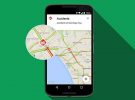
Google Maps locates fixed speed cameras, which appear on our smartphone screen in yellow, as well as mobile speed cameras, which appear in blue. If we zoom in, we can pinpoint them better and often more will appear. When we tap on them, we can see the last time the position of that camera was updated.
Once we start navigation in Google Maps, the cameras will appear as we approach them. In addition, a voice will tell us that we are close to one of these cameras. However, if you do not need this, the navigation gives you the option to turn off voice assistance, although the cameras will still appear on the map.
Can we really trust it?
Google draws on several databases to mark speed cameras on its maps. The most common is the one the DGT itself publishes periodically, which shows the locations of fixed cameras by kilometre point and the stretches where mobile cameras are usually deployed. If you were unaware of these lists, they are available in this list posted on the DGT website, including the location of the last 20 new fixed cameras put into service at the start of the 2019 summer “Operación Salida”.
Maps also collects reports from users themselves, so if we come across an accident, a mobile speed camera or another traffic incident, we can report it in the app. If other users confirm our report, the notification will appear on the map.
And what does the DGT think of speed camera warners?
The Dirección General de Tráfico has never opposed apps like Google Maps or Waze warning about the location of speed cameras. The body responsible for road safety in Spain believes in the deterrent effect of cameras, which is why it publishes the lists mentioned above.
However, what the DGT does not allow is the exact location of mobile speed cameras to be signposted, which Google Maps does. The DGT website publishes the stretches where they are usually placed, but never their exact position, since their placement can change.
Road safety associations have certainly opposed apps that let drivers warn each other about police checkpoints, whether for speeding or drink-driving, such as the SocialDrive app.
So Google Maps and its new speed camera warning system sit somewhere between legal and illegal, but the current regulatory gap allows it. In conclusion, this new feature, which was already available on Waze for example, can be useful if we are slightly over the speed limit, but it must never be a guarantee for racing from camera to camera.
There are devices such as the new Velolaser cameras or the Pegasus helicopter that can detect speeding in the same way, not to mention the increased risk of driving at excessive speeds. Therefore, regardless of whether Google Maps now has a speed camera warning, the first thing we must make sure of is that we keep our heads or, if not, it is better to opt for other transport alternatives such as a taxi or a VTC, for which Google Maps now warns whether the driver is following the optimal route.

 Peugeot E-208 GTi: a battery-powered toy that revives the spirit of the 1980s sports cars
  New Lexus ES: luxury grows and goes electric
  First contact with the Dacia Sandero Hybrid 155: power and efficiency from €19,890
 Comentarios cerrados